


Digital Wallet and Passbook
4.68.00 Reviews
App Specs
- Version
- 2.0.40
- Updated On
- License
- Free
- Downloads
- 50,000+
- Developer
- Redivider
- Categories
- Travel & Local
- Platform
- Android
Screenshots
 Analysis by AppCompare
I like the idea behind Card Wallet: Rewards, Loyalty: keep the cards I reach for in shops together on my phone, rather than rummaging through a physical wallet. It is a travel and local utility from Redivider, and its purpose is straightforward. It is free to start, with in-app purchases listed at $10.99 to $16.99 per item, so I would check the purchase options before relying on it as a completely cost-free setup. The app is rated for Everyone, has a 4.7 average from around 967 ratings, and has passed 50,000 installs. Those figures suggest people have found a use for it, but the practical question is whether a digital card wallet fits the way you shop and use your phone.
Making a card wallet work in everyday life
I find a digital card wallet works best when I treat it as a practical shortcut, not an all-or-nothing replacement for the cards in my pocket. I’d begin with the memberships I use every week, then keep a physical backup until I’ve tried each saved card in its usual setting. That small routine makes it easier to judge whether the convenience genuinely fits my habits and needs.
Readability and navigation at a glance
From the moment I downloaded Card Wallet: Rewards, Loyalty, I was struck by its clean and intuitive interface. You know how some apps just bombard you with a million options from the get-go? Not this one. It was easy to sign up, and within minutes, I was adding my loyalty cards. The app supports a ton of retailers, which is awesome.
A quick setup is especially useful if you are transferring a handful of cards before a shopping trip, rather than trying to digitize every card you own in one sitting. I would start with the cards used most often—perhaps the grocery store, pharmacy, and a regular café—then add less familiar ones when there is time to check the details. That keeps the wallet practical from the beginning and avoids turning the first session into a long sorting task.
Card Wallet is currently on version 2.0.24 and requires Android 6.0 or later. I would treat that as a simple compatibility check before planning to use it on an older phone. The app is free to download, but the listed in-app purchases mean it is worth distinguishing “free to install” from “everything I might want is free.” If you are setting this up for someone else, make sure they are comfortable with any purchase choices before handing over the phone.
Scanning, typing, and the small setup trade-off
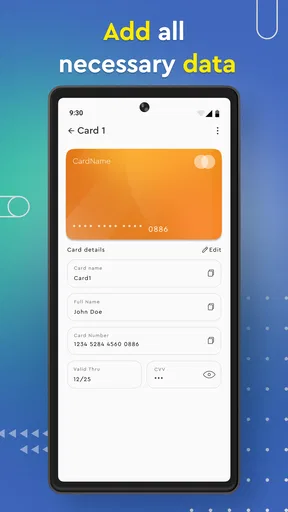
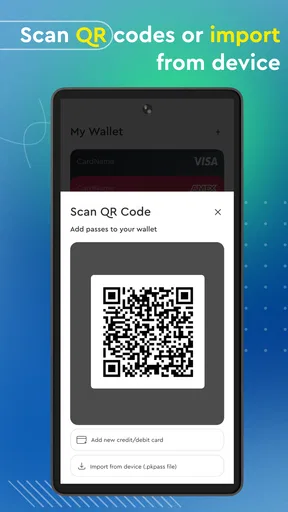
One of the standout features is how simple it is to add cards. All you have to do is scan the barcode or manually enter the card number. Personally, I love the scanning option—so much quicker and smoother than typing in those endless digits. Plus, the app does a solid job of instantly recognizing the card type, which saves a bunch of time.
Even with scanning available, I would keep the physical card nearby until I have tested the saved version at a real checkout. A barcode that looks right on a screen is not a guarantee that a particular store’s scanner will read it on the first try. A useful habit is to add one card, open it at home, and check that the stored details appear as expected before depending on it while a queue is building behind you.
Worth Reading Before You Choose

Flipboard Shows What News Apps Must Do Beyond the Feed

Switching to Android Auto Means Rethinking Your Driving Routine

Google Calendar Makes a Crowded Week Easier to Manage

Ludo King Makes the Most of the Minutes Between Plans

Baby Panda World Brings Quick Play to Modern Phones, but Its Game Library Feels Busy

ESPN’s Live Game View Makes Following Close Games Easier
The scanner’s occasional difficulty in dim light makes the manual option more than a backup in name only. If a card is worn, glossy, or hard to position, entering its number can be the calmer route; scanning is fastest when the barcode is clear and the lighting is good. That small choice matters for anyone who finds holding a phone steady and lining up a narrow code uncomfortable. I would not make a whole collection depend on scanning alone.
Rewards, reminders, and knowing what to verify
Now, let’s talk about rewards. This app doesn’t just store your cards; it actively tracks your points and notifies you about upcoming rewards. I got a notification about a discount that was about to expire, and man, it saved me a few bucks. It’s like having a personal assistant reminding you to take advantage of your perks.
That kind of reminder is most useful when it prompts a decision you can act on: check the offer before leaving home, then decide whether it makes sense to use it on a planned purchase. I would still read the terms shown by the retailer or the reward itself rather than assuming a notification tells the whole story. A reminder can help me remember a perk; it does not replace checking whether it applies to the item, location, or visit I have in mind.
For a realistic routine, picture a grocery run after work. I can open the wallet before reaching the till, locate the store card, and check whether a reward is worth using on that trip. If I receive a reminder earlier in the day, I can decide whether to change my shopping plan rather than trying to interpret an offer while people are waiting. The practical gain is less about collecting every possible point and more about having the relevant card and reminder close at hand when they matter.
Organization for a mixed collection
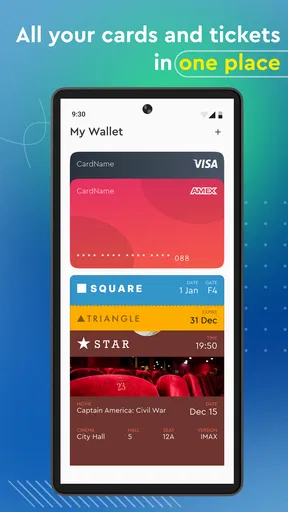
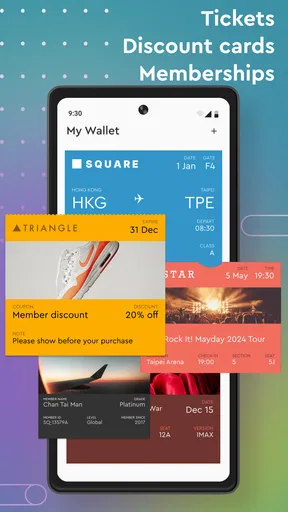
If you're like me, you probably have more loyalty cards than you can count. The app offers a sleek way to organize them all. You can categorize cards, search through them, and even sort them by the ones you use most. No more digging through a pile of plastic every time you hit the checkout line.
For a large collection, I would use categories as a decision aid, not just as tidying. Separating everyday cards from occasional memberships makes the first screen or search session feel less like an inventory and more like a quick route to the card I need. Sorting frequently used cards toward the front is particularly sensible if someone else is waiting at checkout or if I am trying to keep my phone use brief in a crowded shop.
There is a useful trade-off here: a digital wallet can reduce the number of plastic cards I carry, but it also makes the phone the point of access. I would not discard a physical card immediately, especially for a membership I need infrequently or somewhere I may not want to rely on my phone. Keeping a small number of physical backups while learning which saved cards work reliably is a low-stress way to switch.
Using it with different abilities and in different settings
For people who can comfortably use a phone screen and camera, the scan-and-search approach offers a direct alternative to sorting through a card holder. For someone with low vision, motor difficulties, or a preference for fewer visual steps, the experience will depend on how the particular screen, device settings, and scanning conditions work for them. I would test the tasks that matter—finding a card, opening it, and presenting it—before moving a whole collection over. I would not assume a clean-looking interface automatically suits every access need.
Motor comfort is worth considering at the checkout. Scanning asks the user to position a card and phone camera; presenting a saved barcode asks them to hold and orient the phone where a reader can see it. Manual entry avoids aiming at a barcode during setup, though it takes more careful typing. If either movement is difficult, setting up cards at home, when there is no queue or time pressure, can make the process much more manageable.
Sensory context can change what feels easy. A busy shop, bright reflections on a screen, or low light around a barcode can make a normally simple task harder. I would open the needed card before reaching the payment point and increase the phone’s screen brightness if that helps me see it. If alerts are distracting, I would review notification settings on the phone and choose a level that does not interrupt other tasks; the key is to keep useful reminders without letting them become noise.
Security and sensible boundaries
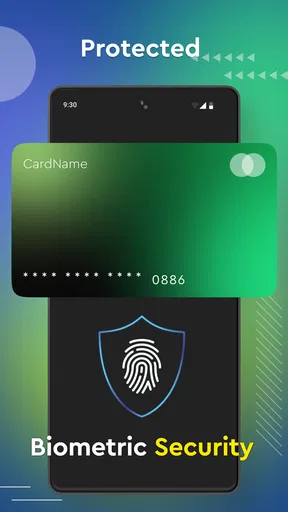
You’re probably wondering about security, right? It’s a legit concern, and thankfully, the app takes this seriously. They’ve got encryption to keep your data safe, and you can even set up a PIN or use biometrics to access the app. It’s like your loyalty cards have their own little vault.
I would still think carefully about what I store in any digital wallet. Loyalty cards and memberships are convenient, but that does not mean I should treat this as a place for payment-card details or sensitive identity documents. A PIN or biometric lock adds a useful barrier when someone else gets hold of the phone, while keeping the phone itself protected remains part of the same routine. If I share a device, I would be especially cautious about who can unlock it.
Compared with a dedicated payment wallet, this app’s appeal is its focus on loyalty and membership cards rather than replacing every payment step. Compared with carrying a physical card holder, it can make a frequently used collection easier to search and sort, but it depends on having the phone available and ready. A retailer’s own app may be better when the goal is to manage that retailer’s account or use features tied to its service; a general card wallet is more appealing when I want cards from different places gathered in one spot.
Where the experience can still snag
Okay, so not everything’s perfect. While the app is great, I did notice a couple of hiccups. Sometimes, the barcode scanner can be a bit finicky, especially in low light. Also, it’d be nice to see more integration with fewer popular retailers. But hey, nothing’s perfect, right?
Those limits matter most when a store is not well represented or its card format does not fit the smooth scan-and-recognize flow. In that case, I would try manual entry if the card permits it, but I would not assume every retailer will behave the same way. If most of your memberships come from a few less common businesses, check those first before spending time adding dozens of cards. The app is a weaker fit if your main need is broad, guaranteed compatibility with every program you use.
Another practical question is whether it can replace the cards you already carry. My answer would be: test before you rely on it. Use a saved card at a familiar store, keep the plastic version in your wallet for that first visit, and only reduce your physical backup once you know the digital barcode is accepted. That cautious approach may feel less dramatic than an instant switch, but it prevents an avoidable checkout problem.
Redivider’s app is a good match for someone who wants a searchable place for everyday reward and membership cards, is comfortable presenting a phone at checkout, and does not mind taking a little time to check each card after adding it. I would skip it if you rarely use loyalty programs, prefer not to store membership details digitally, or need a tool that works independently of your phone. Its Everyone rating makes it broadly suitable by age, but comfort with screens, cameras, and phone security still varies from person to person.
A measured recommendation
All things considered, Card Wallet: Rewards, Loyalty is a fantastic tool for keeping your loyalty cards in check. It’s user-friendly, efficient, and pretty darn reliable. Whether you’re a shopaholic or just someone who likes to keep things organized, this app is definitely worth a shot. So why not give it a go and see how much easier it makes your shopping routine?
Trust me, once you start using it, you’ll wonder how you ever managed without it. Happy shopping!
Pros
- Easy organization of multiple cards.
- Secure encryption for sensitive data.
- User-friendly interface and navigation.
- Supports digital card backups.
- Customizable notifications for offers.
Cons
- Limited support for international cards.
- Occasional glitches during card scanning.
- Ad-supported free version.
- No integration with all banks.
- Requires frequent updates.
FAQs for Digital Wallet and Passbook
What is Card Wallet: Rewards, Loyalty and how does it work?
Card Wallet: Rewards, Loyalty is a mobile application designed to organize and store all your membership, loyalty, and reward cards in one convenient digital space. By scanning and saving your cards, you can easily access them from your smartphone whenever needed, eliminating the need to carry physical cards.
Is Card Wallet: Rewards, Loyalty available for both Android and iOS?
Yes, Card Wallet: Rewards, Loyalty is available for download on both Android and iOS platforms. Users can find the app on the Google Play Store for Android devices and the Apple App Store for iOS devices, ensuring compatibility with a wide range of smartphones.
Are there any security measures in place to protect my card information?
Card Wallet: Rewards, Loyalty employs advanced encryption and security protocols to safeguard your card information. The app ensures that your personal and card details are securely stored, providing peace of mind while using the app to manage your loyalty and reward cards.
Can I add any type of card to the Card Wallet: Rewards, Loyalty app?
The app supports a wide variety of card types, including membership, loyalty, and reward cards. Users can scan barcodes or enter card information manually. While most standard cards are supported, some specific or unique cards may not be compatible, so it’s best to check within the app.
Is there a limit to the number of cards I can store in the app?
Card Wallet: Rewards, Loyalty allows you to store a large number of cards, making it highly convenient for users with multiple memberships. While there isn’t a strict limit, the performance may vary slightly based on the number of cards and your device’s storage capacity.


